Wednesday, June 4, 2014

Cannot Access the Specified Path or File on the Server

Symptom:

Cannot Access the Specified Path or File on the Server on SQL Server Failover Clustering when attached database or create new filegoups

First troubleshooting attempt:

Verify whether disk is part of cluster resource and SQL Server shall have dependency on it. Yes, this is configured as part of Cluster Storage used by SQL Server Instance.

Second troubleshooting attempt:

Anything wrong with the disk? Check through “Computer Management” –> “Disk Management”, surprisingly, the disk status is “Active, Primary Partition”, but other clustered disks only listed as “Primary Partition”

What does active mean? It means the volume is capable of containing an operating system bootable image. But this should not be the case for a disk used purely for SQL Server Databases.

After turn it off, problem resolved.

Steps to turn it off:

Start Administrator Command Prompt:

image

DISKPART> list disk

  Disk ###  Status         Size     Free     Dyn  Gpt
  --------  -------------  -------  -------  ---  ---
  Disk 0    Online           100 GB     0 B
  Disk 1    Online           100 GB 1024 KB
  Disk 2    Reserved       5000 GB  1984 KB
  Disk 3    Reserved       5000 GB  1024 KB

DISKPART> select disk 3

Disk 3 is now the selected disk.

DISKPART> list partition

  Partition ###  Type              Size     Offset
  -------------  ----------------  -------  -------
  Partition 1    Primary           5000 GB  1024 KB

DISKPART> select partition 1

Partition 1 is now the selected partition.

DISKPART> inactive

DiskPart marked the current partition as inactive.

DISKPART> exit

Leaving DiskPart...

1z0-060 Upgrade to Oracle Database 12c - Use OUI, DBCA for installation and configuration (Manage Pluggable Databases)

Manage Pluggable Databases:

image

image

oracle@solaris:~$ dbca -createPluggableDatabase -help
Create a Pluggable Database by specifying following parameters:
        -createPluggableDatabase
                -sourceDB <Database unique name for RAC Database and SID for Single Instance Database>
                -pdbName <New Pluggable Database Name>
                [-createAsClone <true|false Create PDB as clone. When "true" is passed a new PDB GUID is generated for the plugged in PDB>]
                [-createPDBFrom <DEFAULT | FILEARCHIVE | RMANBACKUP | USINGXML>]
                        [-pdbArchiveFile    <Full path and name for PDB Archive file, required when creating new PDB using FILEARCHIVE>]
                        [-PDBBackUpfile    <Full path and name for PDB backup file, required when creating new PDB using RMANBACKUP>]
                        [-PDBMetadataFile    <Full path and name for PDB metadata file, required when creating new PDB using RMANBACKUP>]
                        [-pdbAdminUserName     <PDB Administrator user name, required only when creating new PDB>]
                        [-pdbAdminPassword     <PDB Administrator user Password, required only when creating new PDB>]
                        [-createNewPDBAdminUser     <Specify true if new PDB Administrator user need to be created after plugging in PDB from Archive or File Set.>]
                        [-sourceFileNameConvert     <This clause specifies how to locate files listed in PDB XML metadata file.>]
                        [-fileNameConvert     <This clause specifies how to generate names of files.>]
                        [-copyPDBFiles  <true|false  Specify true if PDB datafiles need to be copied.>]
                [-pdbDatafileDestination <PDB datafile area>]
                [-useMetaDataFileLocation <true|false  Specify true if datafile path defined in metadata file within PDB archive file is to be used when extracting datafiles.>]
                [-registerWithDirService <true | false>
                        -dirServiceUserName    <user name for directory service>
                        -dirServicePassword    <password for directory service >
                        -walletPassword    <password for database wallet >]
                [-lbacsysPassword   <LBACSYS user Password is required for configuring OLS with directory service.>]
                [-createUserTableSpace <true|false  Specify true if a default user tablespace need to be created in new PDB.>]

                [-dvConfiguration <true | false Specify "true" to configure and enable Database Vault
                        -dvUserName     <Specify Database Vault Owner user name>
                        -dvUserPassword     <Specify Database Vault Owner password>
                        -dvAccountManagerName     <Specify separate Database Vault Account Manager >
                        -dvAccountManagerPassword     <Specify Database Vault Account Manager password>]
oracle@solaris:~$ dbca -unplugDatabase -help
Unplug a Pluggable Database by specifying following parameters:
        -unplugDatabase
                -sourceDB <Database unique name for RAC Database and SID for Single Instance Database>
                -pdbName <Pluggable Database Name>
                        [-pdbArchiveFile    <Absolute file path and name for PDB Archive file>]
                        [-PDBBackUpfile    <Absolute file path and name for PDB backup file, required when archive type is RMAN>]
                        [-PDBMetadataFile    <Absolute file path and name for PDB metadata file, required when archive type is RMAN or NONE>]
                        [-archiveType       < TAR | RMAN | NONE >]
                [-unregisterWithDirService  <true | false>
                        -dirServiceUserName    <user name for directory service>
                        -dirServicePassword    <password for directory service >
                        -walletPassword    <password for database wallet >]
oracle@solaris:~$ dbca -deletePluggableDatabase -help
Delete a Pluggable Database specifying following parameters:
        -deletePluggableDatabase
                -sourceDB <Database unique name for RAC Database and SID for Single Instance Database>
                -pdbName <Pluggable Database Name>
oracle@solaris:~$ dbca -configurePluggableDatabase -help
Configure a Pluggable Database specifying following parameters:
        -configurePluggableDatabase
                -sourceDB <Database unique name for RAC Database and SID for Single Instance Database>
                -pdbName <Pluggable Database Name>
                [-dvConfiguration <true | false Specify "true" to configure and enable Database Vault
                        -dvUserName     <Specify Database Vault Owner user name>
                        -dvUserPassword     <Specify Database Vault Owner password>
                        -dvAccountManagerName     <Specify separate Database Vault Account Manager >
                        -dvAccountManagerPassword     <Specify Database Vault Account Manager password>]
                [-olsConfiguration <true | false Specify "true" to configure and enable Oracle Label Security >
                [-registerWithDirService|-unregisterWithDirService  <true | false>
                        -dirServiceUserName    <user name for directory service>
                        -dirServicePassword    <password for directory service >
                        -walletPassword    <password for database wallet >]
                [-lbacsysPassword   <LBACSYS user Password is required for configuring OLS with directory service.>]

Tuesday, June 3, 2014

1z0-060 Upgrade to Oracle Database 12c - Use OUI, DBCA for installation and configuration (Manage Templates)


Managing Templates with DBCA

DBCA templates are XML files that contain information required to create a database. Templates are used in DBCA to create new databases and duplicate existing databases. The information in templates includes database options, initialization parameters, and storage attributes (for data files, tablespaces, control files, and online redo log files).

Templates can be used just like scripts, but they are more powerful than scripts because you have the option of duplicating a database. Duplication saves time because you copy the files of an existing database, referred to as a seed database, to the correct locations.

Templates are stored in the following directory:

ORACLE_HOME/assistants/dbca/templates


Advantages of Using Templates


Using templates has the following advantages:


  • Time saving. If you use a template, then you do not have to define the database.


  • Easy duplication. By creating a template containing your database settings, you can easily create a duplicate database without specifying parameters twice.


  • Easy editing. You can quickly change database options from the template settings.


  • Easy sharing. Templates can be copied from one computer to another.


Types of Templates


Templates are divided into the following types:


  • Seed templates


  • Nonseed templates


Manage Templates:


image


image


oracle@solaris:~$ dbca -createTemplateFromDB -help

Create a template from an existing database by specifying the following parameters:


        -createTemplateFromDB


                -sourceDB    <Database unique name for RAC Database and SID for Single Instance Database>


                -templateName      <new template name>


                -sysDBAUserName     <user name  with SYSDBA privileges>


                -sysDBAPassword     <password for sysDBAUserName user name>


                [-maintainFileLocations <true | false>]


                [-connectionString   <EZCONNECT String for connecting to remote database for example "host:port/servicename">]


oracle@solaris:~$ dbca -createCloneTemplate -help

Create a clone template from an existing database by specifying the following parameters:


        -createCloneTemplate


                -sourceSID    <Database unique name for RAC Database and SID for Single Instance Database>


                -templateName      <new template name>


                [-sysDBAUserName     <user name  with SYSDBA privileges>


                 -sysDBAPassword     <password for sysDBAUserName user name>]


                [-maxBackupSetSizeInMB     <Maximum backup set size (MB)>]


                [-rmanParallelism  <Parallelism value>]


                [-datafileJarLocation       <directory to place the datafiles in a compressed format>]

1z0-060 Upgrade to Oracle Database 12c - Use OUI, DBCA for installation and configuration (Delete Database)


Delete Database:

image

image

image

image

oracle@solaris:~$ dbca -deleteDatabase -help
Delete a database by specifying the following parameters:
        -deleteDatabase
                -sourceDB    <source database sid>
                [-sysDBAUserName     <user name  with SYSDBA privileges>
                 -sysDBAPassword     <password for sysDBAUserName user name>]
                [-emConfiguration <DBEXPRESS|CENTRAL|BOTH|NONE>]
                        [-omsHost     <Enterprise Manager central agent home>
                        -omsPort     <Enterprise Manager central agent port>
                        -emUser     <Host user name for EM backup job>
                        -emPassword     <Host user password for EM backup job>]]

1z0-060 Upgrade to Oracle Database 12c - Use OUI, DBCA for installation and configuration (Configure Database Options)


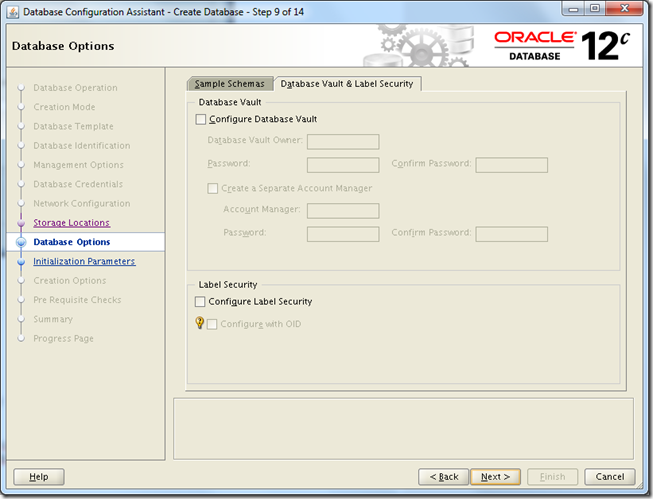
Configure Database Options:

image

image

image

image

image

1z0-060 Upgrade to Oracle Database 12c - Use OUI, DBCA for installation and configuration (Create Database)

Reference URL: http://docs.oracle.com/cd/E16655_01/server.121/e17643/install.htm#ADMQS023

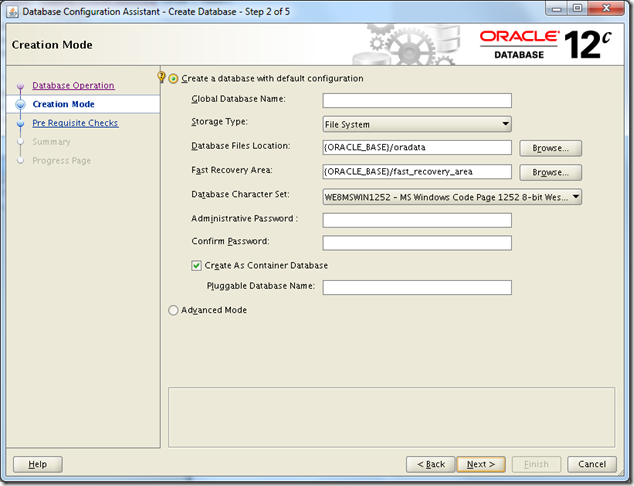
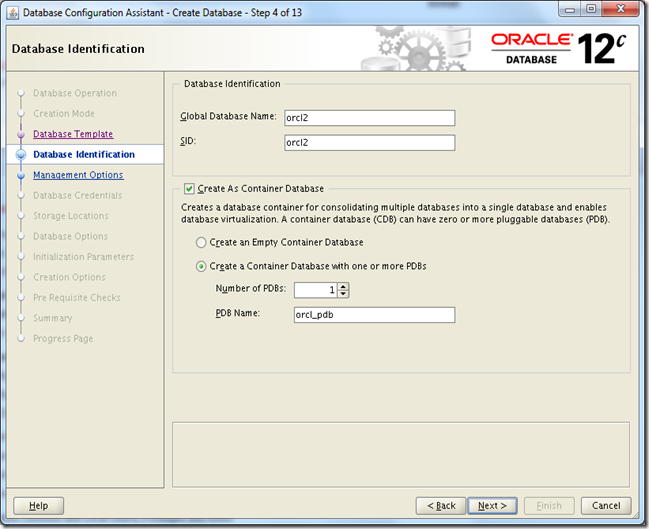
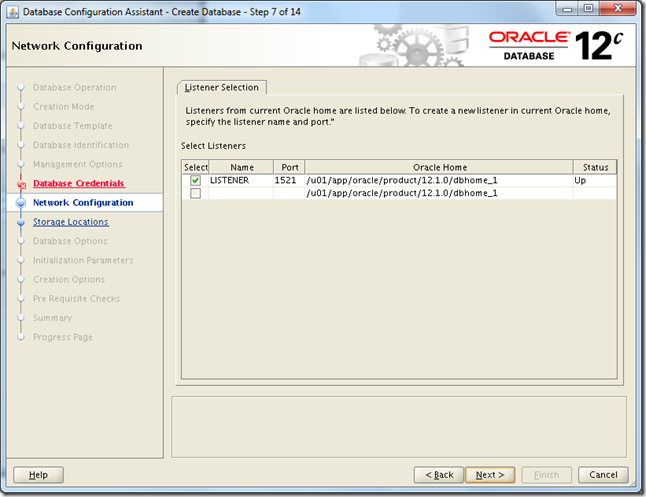
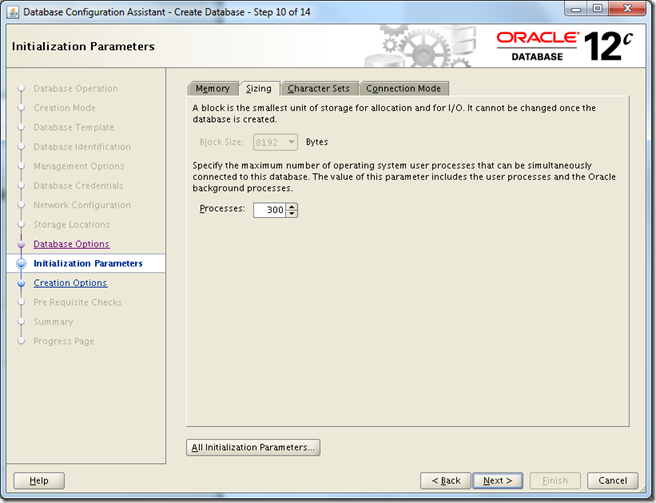
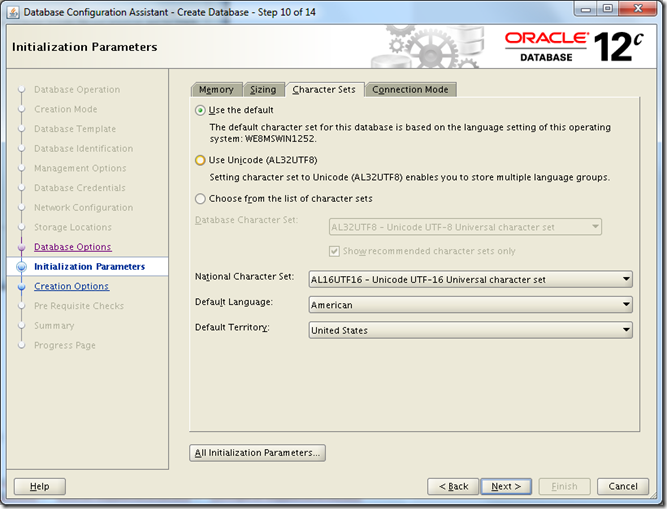
Create Database:

image
image
image
image
image
image
image
image
image
image
image
image

image
image
image
image

oracle@solaris:~$ dbca -help
dbca  [-silent | -progressOnly] {<command> <options> }  | { [<command> [options] ] -responseFile  <response file > } [-continueOnNonFatalErrors <true | false>]
<command> : -createDatabase | -configureDatabase | -createTemplateFromDB | -createCloneTemplate | -generateScripts | -deleteDatabase | -createPluggableDatabase | -unplugDatabase | -deletePluggableDatabase | -configurePluggableDatabase
Enter "dbca -<command> -help" for more option
oracle@solaris:~$ dbca -createDatabase -help
Create a database by specifying the following parameters:
        -createDatabase
                -templateName <name of an existing template in default location or the complete template path>
                [-cloneTemplate]
                -gdbName <global database name>
                [-ignorePreReqs] <ignore prerequisite checks for current operation>
                [-sid <database system identifier>]
                [-createAsContainerDatabase <true|false>
                        [-numberOfPDBs <Number of Pluggable databases to be created, default is 0>]
                        [-pdbName <New Pluggable Database Name>]
                [-sysPassword <SYS user password>]
                [-systemPassword <SYSTEM user password>]
                [-emConfiguration <DBEXPRESS|CENTRAL|BOTH|NONE>]
                        -dbsnmpPassword     <DBSNMP user password>
                        [-omsHost     <EM management server host name>
                        -omsPort     <EM management server port number>
                        -emUser     <EM Admin username to add or modify targets>
                        -emPassword     <EM Admin user password>]]
                [-dvConfiguration <true | false Specify "true" to configure and enable Database Vault
                        -dvUserName     <Specify Database Vault Owner user name>
                        -dvUserPassword     <Specify Database Vault Owner password>
                        -dvAccountManagerName     <Specify separate Database Vault Account Manager >
                        -dvAccountManagerPassword     <Specify Database Vault Account Manager password>]
                [-olsConfiguration <true | false Specify "true" to configure and enable Oracle Label Security >
                [-datafileDestination <destination directory for all database files> |
-datafileNames <a text file containing database objects such as controlfiles, tablespaces, redo log files and spfile to their corresponding raw device file names mappings in name=value format.>]
                [-redoLogFileSize <size of each redo log file in megabytes>]
                [-recoveryAreaDestination <destination directory for all recovery files>]
                [-datafileJarLocation  <location of the data file jar, used only for clone database creation>]
                [-storageType < FS | ASM >
                        [-asmsnmpPassword     <ASMSNMP password for ASM monitoring>]
                         -diskGroupName   <database area disk group name>
                         -recoveryGroupName       <recovery area disk group name>
                [-characterSet <character set for the database>]
                [-nationalCharacterSet  <national character set for the database>]
                [-registerWithDirService <true | false>
                        -dirServiceUserName    <user name for directory service>
                        -dirServicePassword    <password for directory service >
                        -walletPassword    <password for database wallet >]
                [-listeners  <list of listeners to configure the database with>]
                [-variablesFile   <file name for the variable-value pair for variables in the template>]]
                [-variables  <comma separated list of name=value pairs>]
                [-initParams <comma separated list of name=value pairs>]
                [-sampleSchema  <true | false> ]
                [-memoryPercentage <percentage of physical memory for Oracle>]
                [-automaticMemoryManagement ]
                [-totalMemory <memory allocated for Oracle in MB>]
                [-databaseType <MULTIPURPOSE|DATA_WAREHOUSING|OLTP>]]
oracle@solaris:~$ dbca -configureDatabase -help
Configure a database by specifying the following parameters:
        -configureDatabase
                -sourceDB    <Database unique name for RAC Database and SID for Single Instance Database>
                [-sysDBAUserName     <user name  with SYSDBA privileges>
                 -sysDBAPassword     <password for sysDBAUserName user name>]
                [-registerWithDirService|-unregisterWithDirService|-regenerateDBPassword <true | false>
                        -dirServiceUserName    <user name for directory service>
                        -dirServicePassword    <password for directory service >
                        -walletPassword    <password for database wallet >]
                [-addDBOption     <Specify any of the following DB Options as a comma separated list: JSERVER | ORACLE_TEXT | IMEDIA | CWMLITE | SPATIAL | OMS | APEX | DV>]
                [-dvConfiguration <true | false Specify "true" to configure and enable Database Vault
                        -dvUserName     <Specify Database Vault Owner user name>
                        -dvUserPassword     <Specify Database Vault Owner password>
                        -dvAccountManagerName     <Specify separate Database Vault Account Manager >
                        -dvAccountManagerPassword     <Specify Database Vault Account Manager password>]

1z0-060 Upgrade to Oracle Database 12c - Use EM Express

Oracle Enterprise Manager Database Express (EM Express) is a web-based database management tool that is built inside the Oracle Database. It supports key performance management and basic database administration functions. From an architectural perspective, EM Express has no mid-tier or middleware components, ensuring that its overhead on the database server is negligible.

Using EM Express, you can perform administrative tasks such as managing user security and managing database memory and storage. You can also view performance and information about your database.

Enterprise Manager Database Control is no longer available in Oracle Database 12c. You can use Enterprise Manager Cloud Control 12c or Enterprise Manager Database Express 12c to manage your Oracle Database 12c databases.

SQL> select dbms_xdb_config.gethttpsport() from dual;

DBMS_XDB_CONFIG.GETHTTPSPORT()
------------------------------
                          5500

SQL>  select dbms_xdb_config.gethttpport() from dual;

DBMS_XDB_CONFIG.GETHTTPPORT()
-----------------------------
                         8080

SQL>  select value from v$parameter where name='dispatchers';

VALUE
--------------------------------------------------------------------------------
(PROTOCOL=TCP) (SERVICE=orclXDB)


SQL> select value from v$parameter where name='local_listener';

VALUE
--------------------------------------------------------------------------------
LISTENER_ORCL


SQL> ! tnsping LISTENER_ORCL

TNS Ping Utility for Solaris: Version 12.1.0.1.0 - Production on 04-JUN-2014 05:31:14

Copyright (c) 1997, 2013, Oracle.  All rights reserved.

Used parameter files:

Used TNSNAMES adapter to resolve the alias
Attempting to contact (ADDRESS = (PROTOCOL = TCP)(HOST = solaris)(PORT = 1521))
OK (80 msec)

SQL> ! lsnrctl status

LSNRCTL for Solaris: Version 12.1.0.1.0 - Production on 04-JUN-2014 05:24:12

Copyright (c) 1991, 2013, Oracle.  All rights reserved.

Connecting to (DESCRIPTION=(ADDRESS=(PROTOCOL=TCP)(HOST=solaris)(PORT=1521)))
STATUS of the LISTENER
------------------------
Alias                     LISTENER
Version                   TNSLSNR for Solaris: Version 12.1.0.1.0 - Production
Start Date                04-JUN-2014 04:46:56
Uptime                    0 days 0 hr. 37 min. 15 sec
Trace Level               off
Security                  ON: Local OS Authentication
SNMP                      OFF
Listener Parameter File   /u01/app/oracle/product/12.1.0/dbhome_1/network/admin/listener.ora
Listener Log File         /u01/app/oracle/diag/tnslsnr/solaris/listener/alert/log.xml
Listening Endpoints Summary...
  (DESCRIPTION=(ADDRESS=(PROTOCOL=tcp)(HOST=solaris)(PORT=1521)))
  (DESCRIPTION=(ADDRESS=(PROTOCOL=ipc)(KEY=EXTPROC1521)))
  (DESCRIPTION=(ADDRESS=(PROTOCOL=tcps)(HOST=solaris)(PORT=5500))(Security=(my_wallet_directory=/u01/app/oracle/admin/orcl/xdb_wallet))(Presentation=HTTP)(Session=RAW))
  (DESCRIPTION=(ADDRESS=(PROTOCOL=tcp)(HOST=solaris)(PORT=8080))(Presentation=HTTP)(Session=RAW))
Services Summary...
Service "orcl" has 1 instance(s).
  Instance "orcl", status READY, has 1 handler(s) for this service...
Service "orclXDB" has 1 instance(s).
  Instance "orcl", status READY, has 1 handler(s) for this service...
The command completed successfully

http://192.168.56.201:8080/em/

image


https://192.168.56.201:5500/em/


image 


Use the PL/SQL procedure DBMS_XDB_CONFIG.SETHTTPSPORT to set the HTTPS port for EM Express. This will update the HTTPS port in thexdbconfig.xml file in the Oracle XML DB Repository. You must connect as SYS / AS SYSDBA to run the procedure. For example:

SQL> exec DBMS_XDB_CONFIG.SETHTTPSPORT(5500);

As a database administrator, you can log in to EM Express with the SYS or SYSTEM user account to perform administrative and other tasks. Nonadministrative users may also want to log in to EM Express.


For nonadministrative users to have access to EM Express, they must be granted the EM_EXPRESS_BASIC or the EM_EXPRESS_ALL role.


The EM_EXPRESS_BASIC role enables users to connect to EM Express and to view the pages in read-only mode. The EM_EXPRESS_BASIC role includes the SELECT_CATALOG_ROLE role.


The EM_EXPRESS_ALL role enables users to connect to EM Express and use all the functionality provided by EM Express (read/write access to all EM Express features). The EM_EXPRESS_ALL role includes the EM_EXPRESS_BASIC role.


SQL> select  'Privilege' type, privilege from dba_sys_privs where grantee='&grantee'
  2  union all
  3  select  'Role' type, granted_role from dba_role_privs where grantee='&&grantee'
  4  union all
  5  select  'Object' type, owner||'.'||table_name||'('||privilege||')' from dba_tab_privs where grantee='&&grantee'
  6  order by 1,2;

TYPE       PRIVILEGE
---------- ----------------------------------------------------------------------
Object     SYS.DBMS_PERF(EXECUTE)
Object     SYS.PRVTEMX_ADMIN(EXECUTE)
Object     SYS.V_$DIAG_INCIDENT(SELECT)
Privilege  CREATE SESSION
Privilege  EM EXPRESS CONNECT
Role       SELECT_CATALOG_ROLE

SQL> select  'Privilege' type, privilege from dba_sys_privs where grantee='&&grantee'
  2  union all
  3  select  'Role' type, granted_role from dba_role_privs where grantee='&&grantee'
  4  union all
  5  select  'Object' type, owner||'.'||table_name||'('||privilege||')' from dba_tab_privs where grantee='&&grantee'
  6  order by 1,2;
Enter value for grantee: EM_EXPRESS_ALL

TYPE       PRIVILEGE
---------- ----------------------------------------------------------------------
Object     SYS.DBMS_AUTO_SQLTUNE(EXECUTE)
Object     SYS.DBMS_AUTO_TASK_ADMIN(EXECUTE)
Privilege  ADMINISTER ANY SQL TUNING SET
Privilege  ADMINISTER SQL MANAGEMENT OBJECT
Privilege  ADMINISTER SQL TUNING SET
Privilege  ADVISOR
Privilege  ALTER ANY ROLE
Privilege  ALTER PROFILE
Privilege  ALTER SYSTEM
Privilege  ALTER TABLESPACE
Privilege  ALTER USER
Privilege  CREATE CREDENTIAL
Privilege  CREATE JOB
Privilege  CREATE PROFILE
Privilege  CREATE ROLE
Privilege  CREATE TABLESPACE
Privilege  CREATE USER
Privilege  DROP ANY ROLE
Privilege  DROP PROFILE
Privilege  DROP TABLESPACE
Privilege  DROP USER
Privilege  GRANT ANY OBJECT PRIVILEGE
Privilege  GRANT ANY PRIVILEGE
Privilege  GRANT ANY ROLE
Role       EM_EXPRESS_BASIC


SQL> select grantee,granted_role from dba_role_privs where granted_role like 'EM_EXPRESS%' order by 2;

GRANTEE              GRANTED_ROLE
-------------------- ------------------------------
DBA                  EM_EXPRESS_ALL
SYS                  EM_EXPRESS_ALL
EM_EXPRESS_ALL       EM_EXPRESS_BASIC
SYS                  EM_EXPRESS_BASIC

image 
image